In the modern enterprise data landscape, it’s standard for companies to have a large degree of “data sprawl” occurring across the organization. Organizations often need different systems for managing all of their day-to-day operations. These systems can dictate that different cloud providers store their data—whether by design or vendor restrictions— such as Azure, GCP, AWS, Databricks, or other vendor-specific data stores.
In this modern data landscape, we end up in a world where data is fractured and feeding different systems. So it can become increasingly difficult as time goes on for the folks who need to USE that data to figure out where it lives, authenticate from multiple systems for analysis downstream, and so on.
One of the largest value-adds of Fabric comes in data virtualization in the form of “Shortcuts.” These allow for data already stored in a delta format in an external location to stay resident in its existing system while allowing all downstream workloads to access the data without any need for knowledge of what system the data is ultimately stored in. Shortcuts allow data ingestion teams to create a “pointer” inside the Fabric ecosystem, which holds credentials and connection details. Then, all following workstreams can treat the data the same as it would for a native Azure-stored delta table. This delivers four primary benefits:
- Obfuscation of the source system of record, keeping this information on a need-to-know basis for simplicity and security
- Opportunity to create centralized credential management, creating a single service principal for authentication to the source for all production workloads without needing to manage that credential in every individual dataset (single service principal used for all production workloads)
- When leveraging OneSecurity and passthrough of credentials, this allows for managing your data security (RLS/OLS) at the very top of your data pipeline, while having that security model automatically inherited downstream
- Reduced data storage costs & sync issues through reducing data duplication across data pipeline stages by leveraging virtualization
Shortcuts allow the organization to keep complexity and variety of source systems where needed upstream while simultaneously reducing the apparent complexity for the organization’s developers, leveraging this data for analysis, data science, and more.
Beyond the ability to simplify the ingestion into the Fabric ecosystem, an even bigger gain through shortcuts can be achieved by applying them in tandem with medallion architecture to create an elegant stream of data flowing across the organization in a way that wouldn’t have been practical previously simply due to data storage costs and unnecessarily replication in the multiple layers.
In the sample architecture shown below, the medallion “gold” layer is the only layer that is leveraged for analysts in the organization. If a raw data table is needed for any reason down to the consumption layer, we can still create shortcuts across bronze, silver, and gold for the purpose of consistency in architecture and long-term maintenance of the solution in play. In a world before Fabric shortcuts, this would create unnecessary complexity and additional data storage costs across the solution architecture. Instead, through virtualization via Fabric shortcuts, what may have been impractical before is now extremely practical since data storage costs are not duplicated.
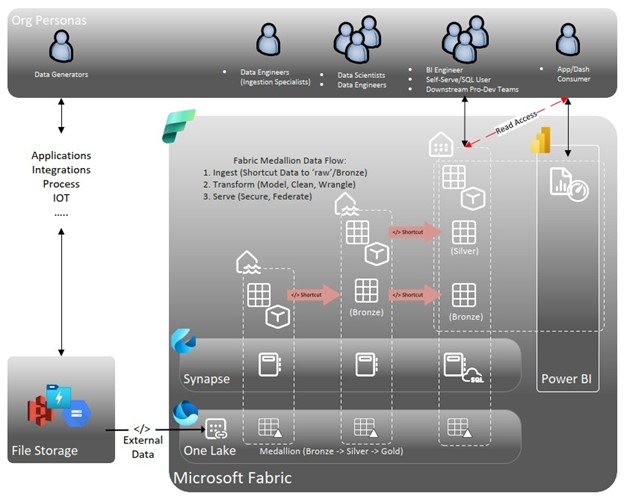
Key points from this sample architecture include:
- The ONLY people who have direct access to your bronze layer are the ingestion data engineers. In the new paradigm of “Ingest, Store, Process, Serve” (or ISPS), the bronze layer serves as an area for raw data to be connected into Fabric through data storage or data shortcuts in OneLake.
- The Silver layer is the home of data transformation. This layer is where data pipelines will primarily live, where most data engineers will operate, and where certain data science workloads will be housed if the workload generates a table for analysis, instead of directly generating insights.
- The Gold layer is the “serving” data layer of ISPS, which feeds into all of the Power BI artifacts (dataflows and semantic models) that the organization will leverage.
Let’s now pull together the pieces of this blog post to connect the first and second half: Fabric lets you simplify the data landscape for every persona featured in the diagram.
- Bronze users are the primary beneficiaries of data shortcuts to non-Azure delta files. Once the shortcut is created, it doesn’t matter what source system is truly storing the data: These users now have a consistent development environment.
- Silver users no longer need to worry about where the data originated; instead, they access all their data inputs directly from OneLake.
- Gold users don’t have access to the swaths of uncleaned data that may not be needed for analysis; they have access to a single point of contact for cleaned, finalized data tables. If access is required to a table further upstream, there is no need to direct queries to a different storage location. Tables from the bronze layer can be accessed in the gold layer as a shortcut, allowing for future data transformations to be injected directly into the existing silver layer without any need for adjustment of queries downstream.
A practical sample: How Shortcuts facilitate a promote-to-production pipeline
In this example, let’s say that a group of citizen developers in the organization needed access to a bronze-level table to build out a new Power BI report. In a pre-virtualization environment, IT teams may have granted access directly to that bronze table, instead of creating an intact bronze à silver à gold pipeline for serving the data. The citizen developers then go through their whole development process in Power BI, building out complex set of data cleansing steps in Power Query, and pushing this report into production.
As time passes, the Power BI COE (Center of Excellence) team has monitored the report published by this group and has noticed that a large number of users are leveraging the report regularly, leading to a desire from the COE to take over the ownership of the report and create a more optimized, code-reviewed version of the dataset for broader distribution. This triggers the start of the COE’s “promote to production” pipeline; however, to relocate that transformation logic into a stage further upstream in the pipeline, we would have to repoint every artifact leveraging that table to no longer point to the bronze table directly, but rather to this new table that we’ve created in the gold layer.
The power that this recommended architecture brings to the equation is that by starting with shortcuts that build the bronze/silver/gold architecture into the picture behind the scenes, we have a solid foundation to build upon when things need to be brought to a higher level. We no longer have to repoint multiple downstream artifacts to a new source. Now we can simply leverage the existing stages to put additional data cleansing/shaping logic into the pipeline. A “lift and shift” of code can be done by taking M scripts from Power Query downstream, and even running that EXACT SAME M script in a data wrangling step upstream.
And here’s the kicker: We can build this architecture into the process without having to worry about refresh coordination and increased data storage costs because the data stays resident upstream.
Massive thanks to my colleague Neal Sullivan for his amazing diagram!
 Data After Dark Tips
Leave a comment